How To Control Vertical Alignment
Q
How To Control Vertical Alignment? - XHTML 1.0 Tutorials - Understanding Tables and Table Cells
✍: FYIcenter.com
A
By default, text in all table cells are aligned to the top vertically. If you want to control vertical alignment yourself, you need to use the "valign" attribute in a "tr" element or a "td" element:
- <tr valign="top|middle|bottom"> - Set vertical alignment to the top, middel, or bottom for all cells in the row.
- <td valign="top|middle|bottom"> - Set vertical alignment to the top, middle, bottom for this cell.
<?xml version="1.0" ?>
<!DOCTYPE html PUBLIC "-//W3C//DTD XHTML 1.0 Strict//EN"
  "http://www.w3.org/TR/xhtml1/DTD/xhtml1-strict.dtd">
<html>
 <head>
  <title>Verical Alignment</title>
 </head>
 <body>
  <h4>Online Order</h4>
  <table border="1" width="250">
  <tr>
   <td>Description</td>
   <td align="right">Qty</td>
   <td align="right">Price</td>
  </tr>
  <tr valign="bottom">
   <td>Email account with 100MB storage,
    Webmail interface, POP3/IMAP access, and
    anti-spam protection</td>
   <td align="right">10</td>
   <td align="right">$9.90</td>
  </tr>
  <tr valign="middle">
   <td>FYIcenter.com ad space
    of 90x30 pixel banner</td>
   <td align="right">1</td>
   <td align="right">$99.00</td>
  </tr>
  <tr>
   <td>1 year access to the VIP members area with no
    hidden fees, and 100% money back guarantee</td>
   <td align="right" valign="top">1</td>
   <td align="right" valign="top">$199.00</td>
  </tr>
  </table>
 </body>
</html>
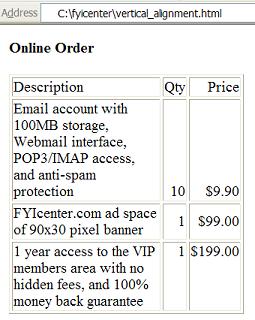
If you save the above document as vertical_alignment.html, and view it with
Internet Explorer, you will see that the first row is aligned to bottom
and the third row is aligned to top as shown below:
2007-05-11, 11144👍, 0💬
Related Topics: