How To Specify a Background Image
Q
How To Specify a Background Image? - CSS Tutorials - Page Layout and Background Image Design
✍: FYIcenter.com
A
The quickest way to specify a background image is to use the background-image style property.
Let's try with an image from the Windows system called, follow.jpg:

The tutorial HTML and CSS document below adds a background image to the DIV tag:
<html><head>
<style type="text/css">
  BODY {background-color: gray; color: white}
  DIV.page {background-image: url(follow.jpg);
    width: 730px;  padding: 25px; text-align: left}
  HR {width: 730px}
  P {width: 730px; font-size: 28px}
  H1 {font-size: 32px}
</style>
</head><body><center><div class="page">
<p>
<img src=fyi_banner_blended.jpg width=728 width=90>
</p>
<H1>Background Image Repeated</H1>
<hr align=left>
<p><script language="JavaScript">
  for (i=0; i<10; i++) {
    for (j=0; j<24; j++) {
      document.write(j+' ');
    }
    document.write('<br/>');
  }
</script></p>
<p align="right">By FYICenter.com</p>
</div></center></body></html>
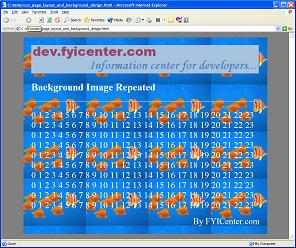
View the document in any browser, you will get something like:
2007-05-11, 5344👍, 0💬
Related Topics: