How To Specify Two Background Images on a Page
How To Specify Two Background Images on a Page? - CSS Tutorials - Page Layout and Background Image Design
✍: FYIcenter.com
If you want to add more than one image to your page background, you can use multiple nested DIV tags. Let's say you want to add one background image to the top left corner, and another one to the bottom right corner, you can add two DIV tags right after the BODY tag. On the first DIV tag, you can specify a background image for the top left corner. On the second DIV tag, you can specify a background image for the bottom right corner.
Let's say you two well designed background images for two corners as shown below:


You can add them with two DIV tags and a matching background color: #
<html><head>
<style type="text/css">
  BODY {background-color: gray}
  DIV.body {background-color: #f0e0c0;
    background-image:
    url(port_as_top_left_corner_0.jpg);
    background-repeat: no-repeat;
    background-position: top left;
    width: 870px; padding: 0px}
  DIV.page {background-image:
    url(port_as_bottom_right_corner_0.jpg);
    background-repeat: no-repeat;
    background-position: bottom right;
    width: 730px; padding: 70px; text-align: left}
  HR {width: 730px}
  P {width: 730px; font-size: 28px}
  H1 {font-size: 32px}
</style>
</head><body><center><div class="body"><div class="page">
<H1>Background Images at Two Corners</H1>
<hr align=left>
<p><script language="JavaScript">
  for (i=0; i<10; i++) {
    for (j=0; j<24; j++) {
      document.write(j+' ');
    }
    document.write('<br/>');
  }
</script></p>
<p align="right">By FYICenter.com</p>
</div></div></center></body></html>
If you view this document, you will see two background images nicely positioned and
matched with the background color:
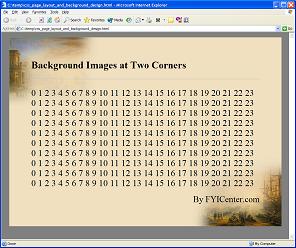
See the other tutorials article on how to create background corner images on FYICenter.com at http://dev.fyicenter.com/faq/css/psp_fading_images_to_background.html.
2007-05-12, 8336👍, 0💬
Related Topics: