How To Test Child Full Width Extension
Q
How To Test Child Full Width Extension? - CSS Tutorials - Understanding Multiple Element Formatting Rules
✍: FYIcenter.com
A
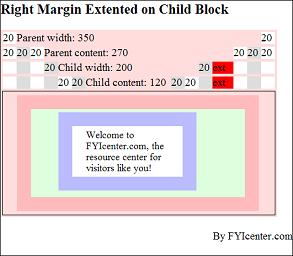
One of the horizontal formatting rules says: if the width of the parent element is specified and greater than the full width of the child stack. the full width of the child stack will be extended match the specified width of the parent element. The HTML and CSS document shows you a good example on this rule:
<html><head>
<style type="text/css">
  H1 {font-size: 20px}
  DIV.page {width: 425px; border: 1px solid black}
  TABLE#out {background-color: #ffdddd}
  TD#box {border: 1px solid black}
  DIV#parent {width: 350px;
    margin: 5px 20px 5px 20px;
    border: 20px solid #ffbbbb;
    padding: 5px 20px 5px 20px;
    background-color: #ddffdd}
  P#child {width: 200px;
    margin: 5px 20px 5px 20px;
    border: 20px solid #bbbbff;
    padding: 5px 20px 5px 20px;
    font-size: 14px;
    background-color: #ffffff}
  SPAN#parentWidth {width: 350px}
  SPAN#parentContent {width: 270px}
  SPAN#childWidth {width: 200px}
  SPAN#child {width: 120px}
  SPAN#w20 {width: 20px; background-color: #ffffff}
  SPAN#g20 {width: 20px; background-color: #dddddd}
  SPAN#ext {width: 30px; background-color: #ff0000}
</style>
</head><body><div class="page">
<H1>Right Margin Extented on Child Block</H1>
<table id=out><tr><td>
<span id=w20>20 </span>
<span id=parentWidth>Parent width: 350</span>
<span id=w20>20 </span>
</td></tr><tr><td>
<span id=w20>20 </span>
<span id=g20>20 </span>
<span id=w20>20 </span>
<span id=parentContent>Parent content: 270</span>
<span id=w20>20 </span>
<span id=g20>20 </span>
<span id=w20>20 </span>
</td></tr><tr><td>
<span id=w20> </span>
<span id=g20> </span>
<span id=w20> </span>
<span id=g20>20 </span>
<span id=childWidth>Child width: 200</span>
<span id=g20>20 </span>
<span id=ext>ext </span>
<span id=w20> </span>
<span id=g20> </span>
<span id=w20> </span>
</td></tr><tr><td>
<span id=w20> </span>
<span id=g20> </span>
<span id=w20> </span>
<span id=g20> </span>
<span id=w20>20 </span>
<span id=g20>20 </span>
<span id=child>Child content: 120</span>
<span id=g20>20 </span>
<span id=w20>20 </span>
<span id=g20> </span>
<span id=ext>ext </span>
<span id=w20> </span>
<span id=g20> </span>
<span id=w20> </span>
</td></tr><tr>
<td id=box><div id=parent><p id=child>
Welcome to FYIcenter.com, the resource
center for visitors like you!
</p></div></td>
</tr></table>
<p align="right">By FYIcenter.com</p>
<div></body></html>
Save this document as ChildBlockExtension.html, and view it with a browser,
you will see how the right margin of the child block is extended to meet the specified width of the parent block:
2007-05-11, 5757👍, 0💬
Related Topics: