How Are the Parent Padding Spaces Collapsed with the Child Margins
How Are the Parent Padding Spaces Collapsed with the Child Margins? - CSS Tutorials - Understanding Multiple Element Formatting Rules
✍: FYIcenter.com
If child block element is enclosed in a parent block element, the vertical margins of the child element could be collapsed with the padding spaces of the parent element. But this rule is Web browser dependent:
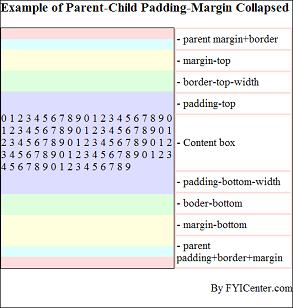
- Internet Explorer (IE) collapses the parent top padding with child top margin.
- Internet Explorer (IE) does not collapse the parent right, bottom and left padding with child right, bottom and left margin.
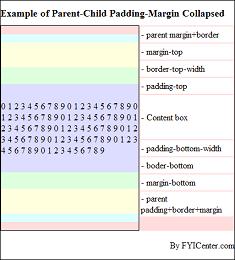
- FireFox does not collapse parent padding spaces with child margins.
The tutorial HTML and CSS document below shows a good example:
<html><head>
<style type="text/css">
  H1 {font-size: 18px}
  DIV.page {width: 425px; border: 1px solid black}
  TABLE#out {background-color: #ffdddd}
  TD#box {border: 1px solid black}
  DIV#parent {width: 250px; background-color: #ffffdd;
    margin: 15px 0px 15px 0px;
    border-width: 15px 0px 15px 0px;
    padding: 15px 0px 15px 0px;
    border-color: #ddffff;
    border-style: solid}
  P#child {width: 250px; background-color: #ddddff;
    margin: 30px 0px 30px 0px;
    border-width: 30px 0px 30px 0px;
    padding: 30px 0px 30px 0px;
    border-color: #ddffdd;
    border-style: solid}
  TD.legend {height: 29px; background-color: #ffffff}
  TD.legend#content {height: 80px}
  TD.legend#parent {height: 45px}
</style>
</head><body><div class="page">
<h1>Example of Parent-Child Padding-Margin Collapsed</h1>
<table id=out cellpadding=0 cellspacing=0><tr>
<td id=box><div id=parent><p id=child><script language="JavaScript">
  for (i=0; i<10; i++) {
    for (j=0; j<10; j++) {
      document.write(j+' ');
    }
  }
</script></p></div></td>
<td valign=top><table>
<tr><td class=legend>- parent margin+border</td></tr>
<tr><td class=legend>- margin-top</td></tr>
<tr><td class=legend>- border-top-width</td></tr>
<tr><td class=legend>- padding-top</td></tr>
<tr><td class=legend id=content>- Content box</td></tr>
<tr><td class=legend>- padding-bottom-width</td></tr>
<tr><td class=legend>- boder-bottom</td></tr>
<tr><td class=legend>- margin-bottom</td></tr>
<tr><td class=legend id=parent>- parent padding+border+margin</td></tr>
</table></td>
</tr></table>
<p align="right">By FYICenter.com</p>
<div></body></html>
Save this document as ParentChildMargins.html, and view it with IE and FireFox,
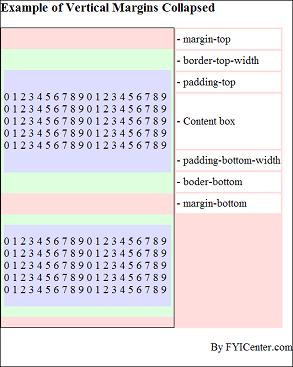
you will see the top padding of the parent block collapsed into the top margin of the child block with IE
as shown in the following image:
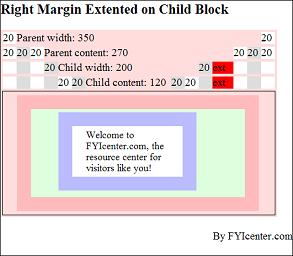
The image below shows you that FireFox does not collapses parent padding spaces with child margins:
2007-05-11, 6517👍, 0💬
Related Topics: