How In-Line Elements Are Mixed in Text Lines
How In-Line Elements Are Mixed in Text Lines? - CSS Tutorials - HTML Formatting Model: Block, Inline and Floating Elements
✍: FYIcenter.com
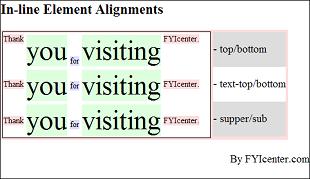
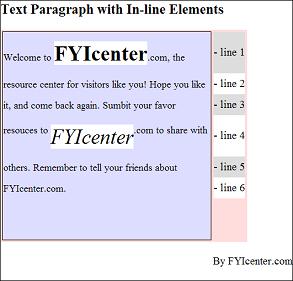
If an in-line element is mixed in a text line, it will be placed immediately after the preceding character. The vertical position of the in-line element will be determined by its vertical alignment style property, vertical-align, as shown in the following tutorial exercise:
<html><head>
<style type="text/css">
  H1 {font-size: 20px}
  DIV.page {width: 425px; border: 1px solid black}
  TABLE#out {background-color: #ffdddd}
  TD#box {border: 1px solid black}
  P#box {width: 300px; height: 300px;
    font-size: 14px;
    line-height: 30px;
    background-color: #ddddff}
  STRONG {font-size: 30px;
    line-height: 60px;
    background-color: #ffffff}
  EM {font-size: 30px;
    line-height: 60px;
    vertical-align: top;
    background-color: #ffffff}
  TD.legend#w30 {height: 30px; background-color: #ffffff}
  TD.legend#w60 {height: 60px; background-color: #ffffff}
  TD.legend#g30 {height: 30px; background-color: #dddddd}
  TD.legend#g60 {height: 60px; background-color: #dddddd}
</style>
</head><body><div class="page">
<H1>Text Paragraph with In-line Elements</H1>
<table id=out><tr>
<td id=box><p id=box>
Welcome to <strong>FYIcenter</strong>.com, the resource
center for visitors like you! Hope you like it,
and come back again. Submit your favor resources
to <em>FYIcenter</em>.com to share with others.
Remember to tell your friends about FYIcenter.com.
</p></td>
<td valign=top><table cellpadding=0 cellspacing=0>
<tr><td class=legend id=g60>- line 1</td></tr>
<tr><td class=legend id=w30>- line 2</td></tr>
<tr><td class=legend id=g30>- line 3</td></tr>
<tr><td class=legend id=w60>- line 4</td></tr>
<tr><td class=legend id=g30>- line 5</td></tr>
<tr><td class=legend id=w30>- line 6</td></tr>
</table></td>
</tr></table>
<p align="right">By FYIcenter.com</p>
<div></body></html>
Save this document as inLineElements.html, and view it with a browser,
you will see that in-line elements are vertically aligned at the bottom.
If the in-line element is a text string, its line-height specifies the full height
including margins. See the following image for details:
2007-05-09, 6256👍, 0💬
Related Topics: