What Is the Text Paragraph Formatting Model
What Is the Text Paragraph Formatting Model? - CSS Tutorials - HTML Formatting Model: Block, Inline and Floating Elements
✍: FYIcenter.com
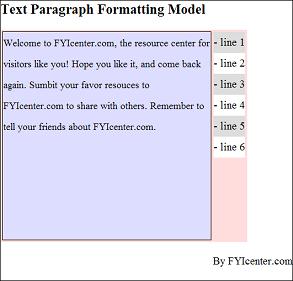
A text paragraph is divided into lines to for a stack of line boxes. Each line box is a rectangular with a line height and sharing the same width as the content box of the enclosing block element.
The default line height is the text font size plus a leading space with a half leading space placed on top of the text, and another half below the text.
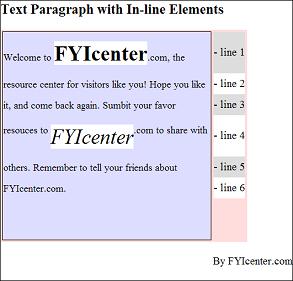
Line height can be changed through the CSS style property, line-height, as shown in the following tutorial exercise:
<html><head>
<style type="text/css">
  H1 {font-size: 20px}
  DIV.page {width: 425px; border: 1px solid black}
  TABLE#out {background-color: #ffdddd}
  TD#box {border: 1px solid black}
  P#box {width: 300px; height: 300px;
    font-size: 14px;
    line-height: 30px;
    background-color: #ddddff}
  TD.legend#w30 {height: 30px; background-color: #ffffff}
  TD.legend#g30 {height: 30px; background-color: #dddddd}
</style>
</head><body><div class="page">
<H1>Text Paragraph Formatting Model</H1>
<table id=out><tr>
<td id=box><p id=box>
Welcome to FYIcenter.com, the resource
center for visitors like you! Hope you like it,
and come back again. Submit your favor resources
to FYIcenter.com to share with others.
Remember to tell your friends about FYIcenter.com.
</p></td>
<td valign=top><table cellpadding=0 cellspacing=0>
<tr><td class=legend id=g30>- line 1</td></tr>
<tr><td class=legend id=w30>- line 2</td></tr>
<tr><td class=legend id=g30>- line 3</td></tr>
<tr><td class=legend id=w30>- line 4</td></tr>
<tr><td class=legend id=g30>- line 5</td></tr>
<tr><td class=legend id=w30>- line 6</td></tr>
</table></td>
</tr></table>
<p align="right">By FYIcenter.com</p>
<div></body></html>
Save this document as paragraphModel.html, and view it with a browser,
you will see that the text paragraph is wrapped into line boxes, with
text placed in the middle of each line box:
2007-05-11, 7315👍, 0💬
Related Topics: