<< < 1 2 3 4   Sort: Date

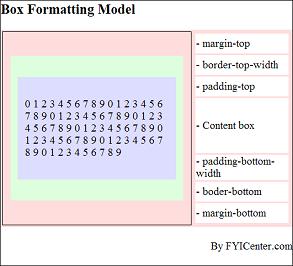
What Is the HTML Element Formatting Model
What Is the HTML Element Formatting Model? - CSS Tutorials - HTML Formatting Model: Block, Inline and Floating Elements An HTML document is divided into HTML elements. Each element is considered as a formatting unit using a box-oriented formatting model, which has: Content Box - A rectangular area f...
2007-05-11, 5081👍, 0💬

How To Specify Is the Color of the Padding Area
How To Specify Is the Color of the Padding Area? - CSS Tutorials - HTML Formatting Model: Block, Inline and Floating Elements CSS doesn't allow you to specify the color of the padding area of a block element. The padding area is part of the background of the block element. In another word, the paddi...
2007-05-11, 5075👍, 0💬

What Are the Page Widths on Popular Websites
What Are the Page Widths on Popular Websites? - CSS Tutorials - Page Layout and Background Image Design If you want to find out what are the page widths on some popular Websites, first enter the following HTML code into a file, pageSizes.html: &lt;html>&lt;body> &lt;p>Page Size Test by F...
2007-05-11, 5071👍, 0💬

Why Is the Top Margin Not Showing
Why Is the Top Margin Not Showing? - CSS Tutorials - Understanding Multiple Element Formatting Rules If you are expecting a top margin to show up, and it is not showing up, it's probably because of the vertical margins collapsed due the following rules: Between two block elements - The bottom margin...
2007-05-11, 5067👍, 0💬

How Wide Do You Want Your Page Content to Be
How Wide Do You Want Your Page Content to Be? - CSS Tutorials - Page Layout and Background Image Design How wide do you want your page content to be? This seems to be a simple question. But not really. Below are some potential answers. None of them is ideal: "I want my page width equal to the screen...
2007-05-11, 5053👍, 0💬

How To Store CSS Definitions in External Files
How To Store CSS Definitions in External Files? - CSS Tutorials - Introduction To CSS Basics If you want to share a set of CSS definitions with multiple HTML documents, you should those CSS definitions in an external file, and link it to those HTML documents using the LINK tag in the HEAD tag as: &a...
2007-05-11, 5050👍, 0💬

How To Set Page Widths to Relative Length Units
How To Set Page Widths to Relative Length Units? - CSS Tutorials - Page Layout and Background Image Design Knowing that setting page widths to absolute length units will cause problems on images with different browser resolutions, you can set your page width to a relative length unit, like px (pixel...
2007-05-11, 5045👍, 0💬

How To Include CSS Inside the HEAD Tag
How To Include CSS Inside the HEAD Tag? - CSS Tutorials - Introduction To CSS Basics If you want to include CSS inside the HEAD tag and apply to the entire HMTL docuemnt, you can use the STYLE tag as &lt;STYLE TYPE="text/css">css_definition &lt;/STYLE>.The following tutorial exercise shows y...
2007-05-11, 4941👍, 0💬

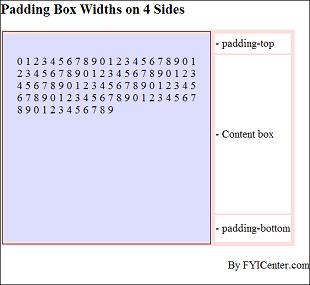
Hot To Test Padding Spaces on All 4 Sides
Hot To Test Padding Spaces on All 4 Sides? - CSS Tutorials - HTML Formatting Model: Block, Inline and Floating Elements If you want test padding spaces on 4 sides of a &lt;P> tag, you can use the following HTML and CSS document. It allows you to specify padding spaces with different values and v...
2007-05-11, 4922👍, 0💬

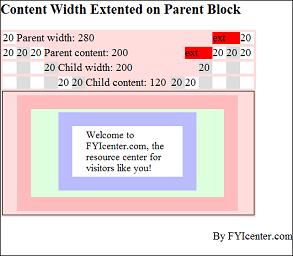
How To Test Parent Content Width Extension
How To Test Parent Content Width Extension? - CSS Tutorials - Understanding Multiple Element Formatting Rules One of the horizontal formatting rules says: If the width of the parent element is specified and less than the full width of the child stack. the width of the parent element will be extended...
2007-05-11, 4917👍, 0💬

What Are the Pseudo Classes on &lt;A> Tags
What Are the Pseudo Classes on &lt;A> Tags? - CSS Tutorials - Introduction To CSS Basics Pseudo classes are classes used by Web browsers to differentiate statuses of a HTML tag. CSS definitions can use pseudo classes as selectors with a leading colon like (:visited). There are 3 pseudo classes o...
2007-05-11, 4776👍, 0💬

How to change style on an element?
How to change style on an element? Between CSS and javascript is a weird symmetry. CSS style rules are layed on top of the DOM. The CSS property names like "font-weight" are transliterated into "myElement.style.fontWeight". The class of an element can be swapped out. For example: document.getElement...
2011-05-31, 4513👍, 0💬

<< < 1 2 3 4   Sort: Date