How To Test Parent Content Width Extension
Q
How To Test Parent Content Width Extension? - CSS Tutorials - Understanding Multiple Element Formatting Rules
✍: FYIcenter.com
A
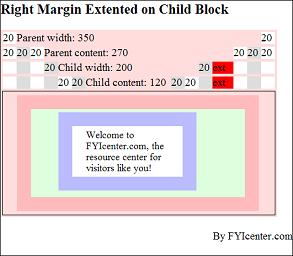
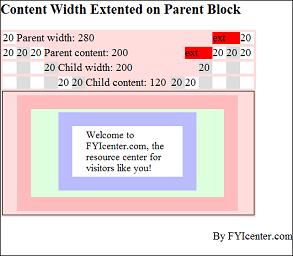
One of the horizontal formatting rules says: If the width of the parent element is specified and less than the full width of the child stack. the width of the parent element will be extended match the full width of the child stack. The HTML and CSS document shows you a good example on this rule:
<html><head>
<style type="text/css">
  H1 {font-size: 20px}
  DIV.page {width: 425px; border: 1px solid black}
  TABLE#out {background-color: #ffdddd}
  TD#box {border: 1px solid black}
  DIV#parent {width: 280px;
    margin: 5px 20px 5px 20px;
    border: 20px solid #ffbbbb;
    padding: 5px 20px 5px 20px;
    background-color: #ddffdd}
  P#child {width: 200px;
    margin: 5px 20px 5px 20px;
    border: 20px solid #bbbbff;
    padding: 5px 20px 5px 20px;
    font-size: 14px;
    background-color: #ffffff}
  SPAN#parentWidth {width: 280px}
  SPAN#parentContent {width: 200px}
  SPAN#childWidth {width: 200px}
  SPAN#child {width: 120px}
  SPAN#w20 {width: 20px; background-color: #ffffff}
  SPAN#g20 {width: 20px; background-color: #dddddd}
  SPAN#ext {width: 40px; background-color: #ff0000}
</style>
</head><body><div class="page">
<H1>Content Width Extented on Parent Block</H1>
<table id=out><tr><td>
<span id=w20>20 </span>
<span id=parentWidth>Parent width: 280</span>
<span id=ext>ext </span>
<span id=w20>20 </span>
</td></tr><tr><td>
<span id=w20>20 </span>
<span id=g20>20 </span>
<span id=w20>20 </span>
<span id=parentContent>Parent content: 200</span>
<span id=ext>ext </span>
<span id=w20>20 </span>
<span id=g20>20 </span>
<span id=w20>20 </span>
</td></tr><tr><td>
<span id=w20> </span>
<span id=g20> </span>
<span id=w20> </span>
<span id=g20>20 </span>
<span id=childWidth>Child width: 200</span>
<span id=g20>20 </span>
<span id=w20> </span>
<span id=g20> </span>
<span id=w20> </span>
</td></tr><tr><td>
<span id=w20> </span>
<span id=g20> </span>
<span id=w20> </span>
<span id=g20> </span>
<span id=w20>20 </span>
<span id=g20>20 </span>
<span id=child>Child content: 120</span>
<span id=g20>20 </span>
<span id=w20>20 </span>
<span id=g20> </span>
<span id=w20> </span>
<span id=g20> </span>
<span id=w20> </span>
</td></tr><tr>
<td id=box><div id=parent><p id=child>
Welcome to FYIcenter.com, the resource
center for visitors like you!
</p></div></td>
</tr></table>
<p align="right">By FYIcenter.com</p>
<div></body></html>
Save this document as ChildBlockExtension.html, and view it with a browser,
you will see how the content width of the parent block is extended to meet the full width of the child block:
2007-05-11, 4918👍, 0💬
Related Topics: