Can you list best practices for globalization and localization
Can you list best practices for globalization and localization?
✍: Guest
Below are the best practices while developing international language support software:
Do not hardcode strings or user interface resources.
Make sure your application depends on Unicode.
When ever you read or write data from various encoding make sure you use the
System.text namespace. Many programmers assume ASCII data.
While testing test it with actual international data and environments.
Whenever we manipulate data for instance numbers, dates or currency make sure
that you are using culture-aware classes defined in System.Globalization namespace.
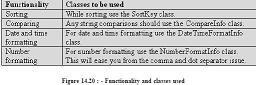
Below is the table which specifies in more detail about the functionality and the
classes to be used to achieve the same.
If a security decision is based on the result of a string comparison or case change
operation, perform a culture-insensitive operation by explicitly specifying the
CultureInfo.InvariantCulture property. This practice ensures that the result is not
affected by the value of CultureInfo.CurrentCulture.
Move all your localizable resources to separate DLLfs.
Avoid using images and icons that contain text in your application. They are expensive
to localize.
Allow plenty of room for the length of strings to expand in the user interface. In
some languages, phrases can require 50-75 percent more space.
Use the System.Resources.ResourceManager class to retrieve resources based on
culture.
Explicitly set the CurrentUICulture and CurrentCulture properties in your application.
Do not rely on defaults.
Be aware that you can specify the following three types of encodings in ASP.NET:
requestEncoding specifies the encoding received from the client's browser.
responseEncoding specifies the encoding to send to the client browser. In most
situations, this should be the same as requestEncoding.
FileEncoding specifies the default encoding for .aspx, .asmx, and .asax file parsing.
2007-11-02, 5571👍, 0💬
Related Topics: