How To Use Different Markers on Ordered List Items
Q
How To Use Different Markers on Ordered List Items? - XHTML 1.0 Tutorials - Understanding Lists and List Items
✍: FYICenter.com
A
By default, browsers will use decimal numbers as the item markers for ordered lists. If you want to change them to something else, like alphabetical letters, you need to use CSS properties. Here is a tutorial sample showing you how to set item markers to be lower case alphabetical letters:
<?xml version="1.0" ?>
<!DOCTYPE html PUBLIC "-//W3C//DTD XHTML 1.0 Strict//EN"
  "http://www.w3.org/TR/xhtml1/DTD/xhtml1-strict.dtd">
<html>
 <head>
  <title>List Item Markers</title>
 </head>
 <body>
  <h4>XHTML Quiz by FYIcenter.com:</h4>
  <p>What is the root element of an XHTML document?</p>
  <ol style="list-style-type: lower-alpha">
  <li><root></li>
  <li><xml></li>
  <li><html></li>
  <li><xhtml></li>
  </ol>
  <p>Your answer: ______</p>
 </body>
</html>
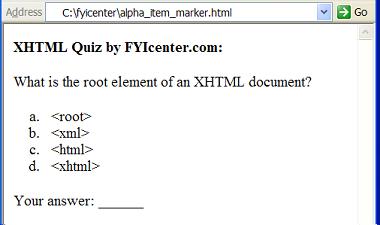
If you save the above document as alpha_item_marker.html, and view it with
Internet Explorer, you will see a list of 4 items with alpha letters as item markers as shown below:
2007-05-11, 5289👍, 0💬
Related Topics: