What Happens When FireFox Knows a Web Page Has Atom Feeds
What Happens When FireFox Knows a Web Page Has Atom Feeds? - RSS FAQs - Atom Feed Introduction and File Generation
✍: FYIcenter.com
When you use a FireFox browser visiting a Web page that has an Atom feed define, FireFox will display a "live bookmark" icon in the status bar. You can click the "live bookmark" to add the Atom feed to the bookmark list.
If you want to see FireFox's "live bookmark" icon, you can use a FireFox browser
to visit the "webmaster.html" page created in previous tutorials. You will the
"live bookmark" icon displayed in the status bar at the right bottom corner
as shown in the picture below:
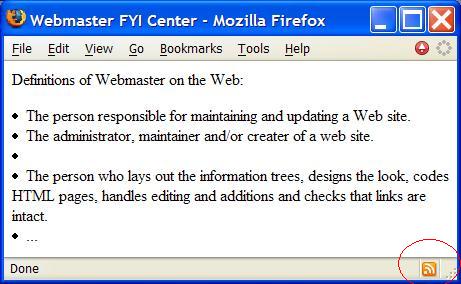
Clicking on the "live bookmark" icon, the Atom feed file "atom.xml" will show up
to allow you to select and add to the bookmark list.
2007-05-12, 6332👍, 0💬
Related Topics:

